Monday, 26 May 2014

What is 3G, 4G, and LTE?

If you own a smartphone, you undoubtedly have heard the terms 3G, 4G, and LTE. Cellular providers such as AT&T and Verizon continuously advertise they have biggest or fastest 4G network or LTE network. It’s difficult to understand how each company can make those claims. However, when buying a new smartphone, it is important to understand the difference. The type of data network can directly impact the performance of your smartphone.

When you buy a smartphone, you are typically required to sign up for a service plan that defines a certain amount of calling minutes and data usage. Once connected to the cellular provider’s network, the smartphone can communicate with the outside world to support features such as email, maps, and Internet browsing. Many of the smartphone apps rely on sending and receiving data across the network.

When describing smartphone data networks, you commonly hear the terms 3G, 4G, and LTE. This refers to the generation of network technology.  The third generation network, known as 3G, is the oldest technology of the group. 4G is the fourth generation data network and LTE stands for Long Term Evolution. The basic difference between them is the speed of the network. When selecting a smartphone, the older models may not support the newer data network technology. It is important to select a model that supports a data speed appropriate for your needs.

3G Network

The 3G network was the first technology with sufficient speed to provide a decent user experience on a smartphone.  There were some smartphones that used the older 2G EDGE technology, but the data speeds were slow and the user spent a lot of time waiting for data to load.

Each of the major cellular providers have 3G networks that provide coverage across most of the country. There are two competing 3G technologies currently being used: Global System for Mobiles (GSM) and Code Division Multiple Access (CDMA). AT&T and T-Mobile use the GSM technology while Verizon and Sprint use the CDMA technology. Since the technologies are not compatible with each other, this is the reason you can’t use a Verizon phone on an AT&T network (or vice versa).

4G and LTE


The 4G technology is the successor to the 3G technology. Cellular providers are still building out their 4G networks. Theoretically, 4G is much faster than 3G. But before we start comparing 4G speed to 3G speed, it is important to understand there are different versions of 4G.

When talking about 4G, things can get a little confusing. Basically, there is 4G and 4G LTE.  Many people consider LTE to be true 4G technology. Generally, if a cellular provider describes a 4G network without mentioning LTE, they are probably talking about a High Speed Packet Access (HSPA) network. The HSPA network is a faster version of the 3G GSM network. While not as fast as an LTE network, it is still faster than a 3G network. Since LTE is still relatively new, the cellular providers haven’t fully built out their LTE networks yet. Be careful when looking at the network coverage maps on the providers’ websites. Some companies claim to have broad nationwide 4G coverage.  They may really be taking about HSPA coverage and not LTE coverage.

In theory, LTE can be up to ten times faster than 3G. In practice, the actual network speed will vary based on network load and signal strength. Even if LTE does not meet its theoretical speed, it is still much faster than 3G. Activities that require large amounts of data, such as streaming movies, work very well on an LTE network. If you plan to perform a lot of data-hungry activities or simply want the best performance when surfing the Internet, you should really plan on buying a smartphone that supports LTE.

If you are considering buying an iPhone, you will find three models available: iPhone 5, iPhone 4S, and the iPhone 4. The iPhone 4S and the iPhone 4 are sold at reduced prices because they are older models. The iPhone 5 is the newest model and supports LTE. The iPhone 4S supports HSPA, which some cellular carriers call 4G. The iPhone 4 will only support 3G networks.

UPDATE – September 2013: The currently available iPhone models are the 5S, 5C, and 4S. The 5S and 5C support LTE while the 4S supports 3G.


When buying a new smartphone, don’t be fooled by all the marketing hype about 4G and LTE networks. Understand the different network technologies available and try using the Internet on the smartphone before you buy. The LTE technology provides the fastest cellular data network available and the speed difference between LTE, 4G (HSPA), and 3G can be quite noticeable.

WI-FI Compabilities


Saturday, 24 May 2014

10 Must Have Android Apps for Students to Survive College

Smartphones are so smart that they can help us in almost all of our jobs. They can help you in kitchen, in your business, entertainment, relax, to connect with your friend and what not.

There are a lot of smartphone app which can help you in your studies. They make your studies easier, simpler and interesting. We have collected 11 such Android apps which are most important for any student. They can help you in making projects, in calculations, interviews, preparations and many other things.


1. Evernote


With Evernote you can create to-do lists, task lists, schedules so that you don’t forget them. Create notes on Evernote on any subject. You can also edit your notes or lists. With Evernote, you can not only keep your notes and lists on your phone but can also sync them across all other devices so that they are available to you everywhere.

This app is available for both Android and iOS. It has good social media integration. Share your notes with your friends. You can also make sketches in your notes or work in your own handwriting, it is so simple with Evernote. You can add images and even search for text inside images.

2. Dropbox


Dropbox is an extremely important app for students. You can keep your documents, notes, files, classroom presentations etc in cloud storage for free. Sync it with all other device and access them from anywhere.

You can also open your email attachments in Dropbox or mail a file from Dropbox to your friends. It is easy to edit documents right at your Dropbox. This app is very secure so your documents are safe here

3. Wolfram Alpha


Wolfram Alpha has become world’s definitive source for instant expert knowledge and computation. It uses a vast collection of algorithms and data to compute answers and generate reports for you. It collects data from almost all emerging domains in the world

.4. Dictionary.com

This is one of the most famous dictionary app for Android. It has got wide popularity and over several million downloads. It’s a full dictionary and thesaurus with over 2,000,000 definitions, synonyms & antonyms.

You will find all types of proverbs, idioms & phrases in it. Whenever you search a word in it, you will get the basic meaning along with its pronunciation, word origin and history.

5. StudyBlue Flashcards (Free)


It is a free service that tracks study session progress and more. They allow you to study and explore more. Make, edit and save content and access an enormous library of classmate-created materials. Study wherever and whenever you want.

You can create your own flashcards by inserting text, pictures and audio. Find online flashcards and notes from millions of classmate-created materials. It allows you to send messages to your classmates to ask questions or doubts. You need a StudyBlue.com account to use this app.

6. RealCalc Scientific Calculator (Free)


It is a fully featured scientific calculator developed by Quartic Software. This special scientific calculator has all the traditional and modern calculating tools.

It allows unit conversions, Binary, octal, and hexadecimal along with calculations with a full built-in help system. It has 10 memories to store your inputs. Also, it can save your history

7. Scribd – Read unlimited Books


Scribd is world’s largest digital library with a vast collection of books and magazines. It is a very important app for students. You can get unlimited access to over 100,000 books with $8.99/month.

You will find a good collection of books under all domains, best sellers, genres, literary classics, fiction etc. There are millions of user-contributed documents and written books. Interesting thing is that it gets synced with all your devices so access your books from anywhere.

8. Flipboard


Flipboard is your personal news and updates magazine. It is fully customizable. You can get updates on the topics and areas you want. Save stories that you like in your magazine. It is a good app for students to stay up to date with latest updates and trending topics.

Flipboard has good social media integration. You can connect with up to 12 social media networks on Flipboard. For quicker access to the app, it comes with an Android widget. It allows you to search for anything like people, live scores or matches, trending topics, blogs, your favorite sites etc.


9. Skype


Skype provides you the facility of free voice and video calls. It has free instant messaging interface also. Stay connected with your friends and family.

More and more people are getting connected with Skype daily. You just need to know a person’s Skype id to connect with them. Skype also provides low costs mobile and landline calls. Share your photos with your friends and group members. It also has video messaging feature. Just shoot video of life moments and share them with your friends.


10. Self Control


Self Control helps you in studying by helping you to reduce intemperate use of your smartphone. Smartphones affect our studies as we are so much addicted to see the notifications, updates, messages, playing games etc on smartphone.

For a specified period of time the execution of apps banned in order to help to focus a little more. When you execute Apps for a specified period of time, phone screen will switch to studying time display automatically.


11. Sleep if U can Alarmy


It is the most annoying alarm app in the world. When the alarm starts ringing then you have to go to the registered place and take a picture to stop the alarm.

It is a good solution for those students who find it very difficult to get up at time even with an alarm clock. This app will surely get you out of your bed.


If you think we missed any other important app then please let us know in the comments.

Friday, 23 May 2014

Best Android Apps to Watch Videos Online

We have compiled a list of best Android apps to watch TV shows and movies online. With this you no longer need to be home at time so as not to miss your TV show. You can watch all your shows on your smartphone. These apps are available for free and are easy to download and install.
Let us have a look into their features.

1. Netflix

Netflix is the most popular subscription service for watching TV episodes and movies. With this app you can watch thousands of movies and TV shows online.
How does Netflix work?
  • Netflix membership gives you access to unlimited TV shows and movies for one low monthly price.
  • With the Netflix app you can instantly watch as many TV episodes & movies as you want, as often as you want, anytime you want.
  • You can Browse a growing selection of thousands of titles, and new episodes that are added regularly.
  • Search for titles and watch immediately on your phone or on an ever expanding list of supported devices.
  • Rate your favorite shows and movies and tell us what you like so Netflix can help suggest the best titles for you.
  • Start watching on one device, and resume watching on another. Check out netflix.com for all the TVs, game consoles, tablets, phones, Blu-ray players and set top boxes on which you can watch Netflix.

2. Crackle – Movies & TV

With Crackle you can watch movies and TV shows for free on your smartphone or tablet. This app lets you watch full-length Hollywood movies and TV series. They keep on adding new movies and TV episodes each month. The best thing is that this app is available for free, no monthly charges.
Manage your watchlist online or on the app. The updated version has new Wi-Fi only option that allows to view content without using your data connection. However, the app works in US, Canada, Australia, Brazil and Latin America.

3. Movies by Flixter

Flixter lets you stream and download full-length movies. You can browse top box office movies and the movies opening soon. It also lets you look up for the showtimes at your favorite theater.
It has a section of critic reviews by Rotten Tomatoes. Watch high quality trailers of upcoming movies. Create and manage your watchlist, rate & review movies. With this app you can also manage your Netflix queue.

4. IMDb Movies & TV

This is the Android app from the famous IMDb website. You can watch movie trailers, user reviews on movies, ratings, critics reviews for movies and TV shows, etc. You can also look up for movie showtimes at the local theaters near you.
It lets you watch recaps of TV shows from the previous night. Get latest entertainment, celebs news from hundreds of media outlets. Explore top rated movies by IMDb, US Box office results, most popular celebrities of the day on IMDb, Lowest rated movies of all time, etc.

5. Crunchyroll- Anime and Drama

Watch over 25,000 episodes and 15,000 hours of latest and hottest Anime & Asian Drama 1 hour after TV broadcast! Catch the hottest shows like Naruto Shippuden, Attack on Titan, Gargantia, Sword Art Online, Bleach, Shugo Chara, Blue Exorcist, Gintama, Fate/Zero, Hunter X Hunter, Toradora, and more.
Crunchyroll offers both FREE (no membership required) and premium service.

Ways to Use Keyboard to Enhance Mobile User Interface

What mobile developers tend to ignore when designing mobile apps is the importance of user interface. You don’t need to make your mobile app similar to how your desktop app would look. At the end of the day, the way you use your mobile and desktop differ. You need to make your mobile app more engaging and evolving as compared to the desktop version.

Who are you satisfying with your mobile app? Who is your user? When you get the answer to these questions, your interface automatically enhances to fit the image of your user. You will see that unless the user is not satisfied, there is no way to make your mobile app popular.

User interfaces is what will make or break your mobile app. It is the user interface that tends to make your app popular among the known audiences. Your brand will be recognized, the brand’s visibility will be improved only when the audiences enjoy what the brand has to offer, and this includes the mobile app.


Areas to Focus

When designing your mobile app, you need to ensure that you focus on some particular areas. This would help design the right user interface for your mobile app.
Intuition is your first focus point when designing a mobile app. Do you think the tool you are designing is intuitive in its interaction? This should be the first question that you answer when designing a mobile app. The second question that you should answer while designing a mobile app would be if the user can find his/her way around, manipulate the tools and access the menu options easily. In case you have answered positively to both the questions, your app is indeed intuitive.

Speed should be your second consideration when designing a mobile app. Is the user interaction fast, or is it too slow for words. When you are designing a mobile app, you should be able to have an app which allows your users to perform basic tasks easily and with speed.


The visual appeal is the third consideration that you need to account for when designing a mobile app. Aesthetics play an important role in any mobile app design which is being considered with respect to the user interface. Unless it is visually appealing, it will not attract your audiences enough for them to try it out once. So, make sure you focus on the visual of your mobile app.


Using Keyboard for User Interface


The keyboard of your mobile is pretty small. When using a mobile app, you suddenly find the keyboard pretty frustrating and small. You may find that your user stops sharing content because of the frustration involved when using a small keyboard. Some apps have gone to the extent of deleting the use of keyboard.
When you use SnapChat, you are actually communicating using images. Keyboard can hinder your user interface, which should not be done in reality. How do you use keyboard in a way that it enhances the use of a mobile app without hindering in the user interface.

The Smart Keyboard


The keyboard, which is a part of your mobile app, should be able to adapt to the user’s habits.  It should be able to respect the context in which the user would be typing. For example the writing habit would be different when chatting from that when writing a formal mail. Keyboards should be able to identify this, which would in turn prevent the frustration.

Autocorrect Not Always Correct


It is very important for you as a developer of mobile apps to understand that autocorrect feature should help the user and not frustrate him in any way. Don’t allow autocorrect to buzz in when the person is typing their password. Don’t allow autocorrect to buzz in when the user is typing slang. There is no need for auto correct feature in here

Versatile Keyboard

Your app should allow your users to type in whichever orientation they prefer i.e. portrait and landscape. In case your app allows only one orientation, it can be very frustrating to the user and would spoil the whole game of user interface that you have spectacularly built.
Remember, keyboard is a very important part of user interface. Neglecting it will only add to the unpopularity of your mobile app.

Thursday, 22 May 2014

Best Android Apps to Make you Smarter and Intelligent

We play a number of games to keep our mind fresh. We exercise daily to keep our body fit and healthy. Don’t you think we should do something to keep our brain healthy, intelligent and smart.

Well, there are certain apps that can actually help you in being smart and intelligent. While using these apps you will learn a lot of things and you will actually enjoy them. We have collected such 7 Android apps that can help you learn smartly and intelligently.

1. HowStuffWorks


With this great app you can access over 30,000 articles, podcasts, quizzes, and videos all in one place. It gives you instant access to articles and podcasts on your Android smartphone.

With this app you can also chat directly with the podcasters or read their latest blog posts. Set push notifications to get access to the latest updates quickly. You will find the coolest stuff on the planet on this app.

2. TED


It is the official TED app that lets you know about fantastic people and technology throughout the world. It presents talks and presentations of those people. People talk about their experience, discovery, product etc.

They invite experts from all major fields like education radicals, tech geniuses, medical mavericks, business gurus, and music legends. There are more than 1700 TED talk videos and audios. Compatible with Android Smartphones and tablets. All the data is fully translated and localized in 22 languages.


3. Atlas 2014


Atlas lets you view quality world maps conveniently on your Android. You can quickly locate countries, know its time zone, latitude, longitude etc.

The app is very easy to use. You can move through the map and find places. Carry it with you in your phone for quick reference.

Smartphone Apps to Manage Your Diabetes

Diabetes can be a difficult condition to manage. It requires you to be super alert. You have to watch everything you ingest, make sure you undertake a certain amount of exercise each day, and keep your sugar levels in check via regular medical tests. For those suffering from advanced diabetes, it is worse.

All this tracking and logging can quickly become a hassle. Apps for mobile devices can therefore make life a lot easier for you by giving you a convenient platform to manage your diabetes. And since you always have your phone on you, logging and accessing your diabetes-related information in a pinch becomes a breeze.

We are bringing to you a varied collection of diabetes apps to help you manage your condition better. Go through them, download and use their free versions, and zero in on the ones best suited to your purpose and lifestyle needs.

1) Glooko


For: iOS, Android 
Cost: Basic version for free


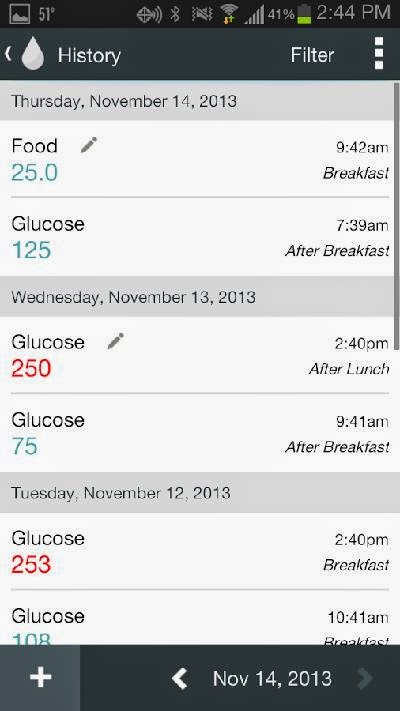
This top-rated app works by downloading your blood glucose readings to your mobile device. From then on it’s a matter of you logging in the important metrics to effectively manage your diabetes.

You can log in your meals to keep a track of the carbs and sugar ingested on a daily basis. You can also log in data pertaining to your insulin levels, your medication, and the amount of exercise you undertake.

The data is backed up to the cloud and can be synced across devices.

Glooko is free to use but requires you to register so that you can share your data online. While this app is rich in features and compatible with a number of devices, many of the features are only available/relevant to American users: for example, the presence of hundreds of American healthcare professionals online who have access to your diabetes data.

For the rest, it’s best to use this app as a digital log for your daily food intake, exercise levels, and insulin readings. Better than Excel spreadsheet and manual recording of the data.

2) mySugr Companion


For: iOS, Android

Cost: Basic version for free

This is a nifty, clever, and fun diabetes management app that helps you log your food and medication data on a daily basis, and generate graphs and reports. It has a ‘diabetes monster’ which you aim to slay every single day by staying on track with your food and medication. You can also set reminders to check your blood glucose periodically.


The interface is fun and using the app is almost like playing a game. It gives you challenges to set, motivates you along the way, and rewards for pulling it all off successfully, day after day. It syncs across devices and even generates medical reports. Definitely worth a try!

3) OnTrack Diabetes


For: iOS, Android

Cost: Free
As the name suggests, OnTrack Diabetes is a simple yet effective way to keep a track of everything you need to in order to manage your diabetes.

The interface is clean and extremely user-friendly. Create and edit categories as per your requirements, track food, your haemoglobin levels, your body weight, and any other relevant metrics for you to manage your condition. Define your glucose range goals and set reminders to keep you on track to meet them.

You can also generate reports and graph trends, based on real-time data, to show your doctor.